Featured

The Guy Behind World of Code

Peter Tran

Web Developer

“Writing organizes and clarifies our thoughts. Writing is how we think our way into a subject and make it our own. Writing enables us to find out what we know—and what we don’t know—about whatever we’re trying to learn.”

—  William Knowlton Zinsser.

Hello my name is Peter and the guy up there is my Dad. Just kidding, that’s me, and I am the face behind World Of Code. I am currently a senior at Wake Technical Community College studying Web Development. As of right now, I have roughly three years of web development experience under my belt. The knowledge that I acquired came from Coding Bootcamps, Udemy , and the Open Source community. I am always trying to improve my skills and further my career. As a result after this semester, I will be going for a bachelor in Computer Science.

The reason I started this blog was to have a centralized area where I can express all my thoughts, emotions, and what I find interesting in the World of Code. This blog was meant to be educational with a hint of me in it. It will encompass a broad range of technology topics such as development, design, SEO , as well as hints and tips .

The World of Code is limitless and the only thing stopping your creativity is yourself. As a result let all become better developers together. Come follow me on my journey in Full Stack Web Development and watch me grow as a web developer!

SPA, The New Kid On The Block

SPA or Single Page Application

A Single Page Application or more commonly called a SPA is web based app that dynamically re-render a page rather than loading whole new pages from a server. In a SPA, the page doesn’t need to be updated since content is downloaded automatically. This approach avoid interfering with the user experience between alternating “pages”. In another word, the user will continue to interact with the web page while new elements are being updated or fetched. As a result much faster interactions and content reloading is provided. Single page applications are very common and you probably used one . Facebook, Netflix, Instagram, New York Times, Trello are some of the companies that uses a Single Page App.

SPA are based mainly on JavaScript, which gives it the ability to execute program logic, interact with the user interface, and communicate with the web server. They been gaining mass popularity because frameworks such as React, Vue, and Angular has made it simpler to create a SPA than previously required. These frameworks are responsible for handling the heavy lifting on the client side for a single-page app.

When is it necessary?

Does your idea require real time experience, or fast speed? An example of this is customizing a pair of sneakers to your own specification without a page refresh. A SPA is ideal for this situation because the user wants to see, in real time, how their shoe design is coming out. On the other hand, if your web app requires a lot of user inputs and event handlers. These can come in shape as form based centric application. If this need for a rich interaction is required between the user and your application, an SPA is almost a necessity.

When is it not necessary?

Although Single page apps are viewed by some as a modern approach to front end development, this is not always the case. This is very subjective and can be interrupted differently by different people. Most of the website you are using now a days, many of which are newly built website, are not following the single page application format. Modern web development is more of a guideline than a rule book.

One of the reason not to built a SPA is overhead. If you just need a simple website for a mom and pop shop a single page app is an overkill. Front end development is updating constantly so maintain you application will takes much longer and be much harder if your website is built as a SPA.

The Pros of a Single Page App

Although Single Page Apps are not ideal for all situation, or even most situation a web page is needed, there are some advantage to using a SPA.

  • Fast and responsive
  • Great for poor connectivity devices
  • Easy Debugging Programs

The Cons of a Single Page App

Surely after reading this blog you can come up with the conclusion that SPA is ideal for certain situation and should not follow a one size fit all approach. Just like there are advantage to SPA there are disadvantages as well.

  • Search Engine Optimization problems
  • Larger overhead required
  • Browser is not great at getting SPA Statistics
Importance of Accessibility

My Thoughts on Accessibility

Accessibility is defined as the ability to access something regardless the condition the person is in. These conditions or handicaps could be things such as hearing impairments or difficulty seeing. With this being said, web accessibility is the ability to access the web regardless the condition/conditions the person has. It makes the web equal for everyone. Web accessibility is important because of how big the web has became.

According to PewResearch, 77% of Americans goes online on a daily bases. That is a huge amount of people accessing the Internet everyday. It wouldn’t be fair for some people to have access to the entire Internet, meanwhile a portion is restricted for others. For example, people who can’t see should have the same luxury of accessing the Internet as a person who can.

The use of screen readers and web accessibility make this possible. Screen reader is very powerful, it give the ability for people who cant see access to information that everyone else can. Although it is powerful, it can’t do everything. For example, a screen reader can’t “read” a picture. To make this possible web designers/ developers include an alt attribute to the image for the screen reader to process. The alt attribute gives the screen reader an “alternative” method to process an image.

You can learn more about alt attributes using “w3school” .This website gives a lot of information on how and why making the web accessible for everyone is something every web developer/designer should look into.

I have included links below for more information about this topic

1. Why Web Accessibility Is Important
2. Usage of the Internet in America
3. Tips To Make Your Website More Accessible

Top 3 Best CSS Frameworks

What is a CSS Framework?

A CSS framework is a collection of CSS files that can be applied to multiple web developing or design projects to reduce the time spent structuring layouts, removing typography errors, and ensuring browser compatibility.

1. Bootstrap

Bootstrap is a a free CSS framework that helps you design and make your websites faster. It offers templates, buttons, tables, navigation, and etc… for your website. It has a powerful responsive design due to its grid system, therefore it is easy to use. Bootstrap makes it so your design will look great on all screens as well as resolutions.

2. Pure

Pure CSS is a framework made by a famous web-service company called, “Yahoo” back in 2014. Pure specializes in offering a very lightweight collection of responsive CSS templates and components in order to create a responsive layout for your website.

3. Foundation

Foundation is known for being “The most advanced responsive front-end framework in the world.” Foundation has a sophisticated framework, is very flexible, and is easily customizable. Foundation can also be used to create nice responsive HTML emails. It is a very helpful for email marketing companies.

Programs That Are Great for Web Design

1. Adobe Photoshop

Adobe Photoshop is a premium program that allows users to edit and enhance photos for better a quality. Then web designers such as us can use thes photos for websites to fit aesthetically and etc… You can do anything from attaching images to adding a whole other background to your picture. The possibilities are endless. However with the many possibilities, it is advised that you have training before you start to get you familiar with the software.

2. Google Web Designer

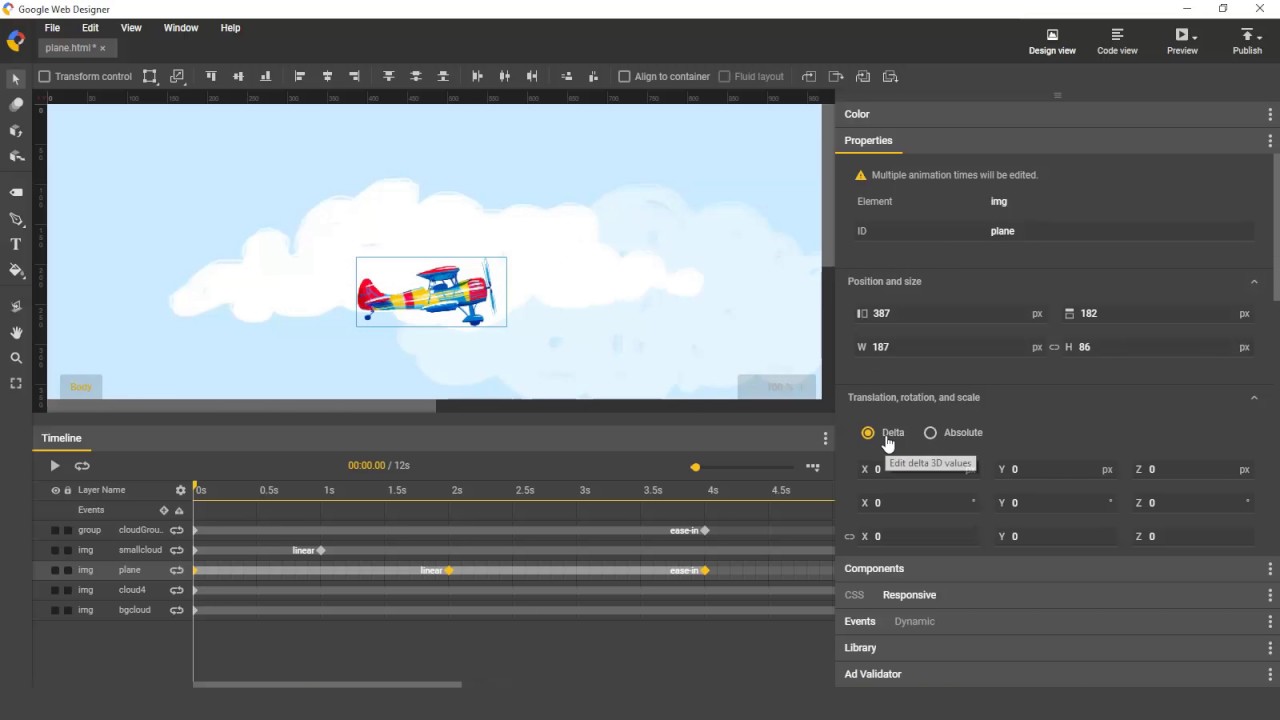
Google Web Designer is a free-to-use software that has powered thousands of websites alone! It is mainly used in conjunction with CSS3 and HTML5 to make fun animations for websites. It lets you create animations and interactive elements to bring your imagination to life.

3. Adobe Dreamweaver

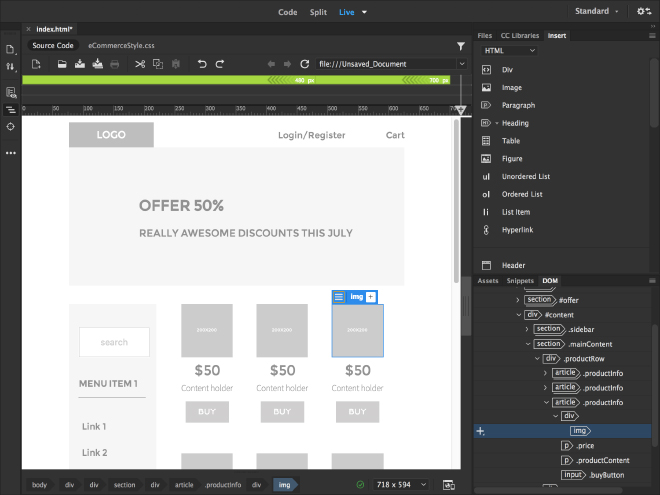
Adobe Dreamweaver is today one of the most popular applications for offline web design and creation. Due to its simplified coding engine, you can build, code, and manage dynamic websites. This program also offers visual aids to reduce errors and speed up site development. This program has been popular since 2005.

The Best Free Tools for Web Development

As a web developer, there are certain tools that are essential to our line of work. Web development tools have come a long way; from limited programs to over thousands. However, you might think to yourself, “With so many, how will I know which are the best to use?” For that, I have compiled a list of tools that web developers all over the world have used.

1. Sublime Text

Sublime Text is an application development tool that provides a simple, but well-designed layout for developer at all sorts of levels. Many people see it as an upgrade from another widely used text editor called notepad/notepad ++. In fact, Sublime is one of the fastest coding software in the world. Because of this, Sublime text has a rating of 4.7/5 stars.

2. GitHub

GitHub is the world’s leading software development platform. It is a website and cloud- based software that allows developers to store and maintain their code, and also allows them to monitor and control application changes! It also provides several collaboration features such as task management tools for each project, wikis, and etc…

3. Chrome DevTools

Chrome development tools are used from small businesses to huge businesses. It provides a set of tools for developers that is also built in a search engine called Google Chrome. This tool allows developers to run & debug JavaScript directly in the console, edit the pages on-the-go, and easily diagnose problems. This tool also helps reduce the website lag which is really helpful.

How to Have a Successful Job Interview

A great job interview is important to lock in that job offer that you are waiting for. In a job interview, even a small mistake could cost you your job. By reading this article, this will make your meeting with the hiring manager a success!

1. Conduct Research

When accepting an interview, you should always do research first. Hiring managers expect you to know some info about the company and why you would be a good fit there. You should learn as much as possible about the company you are interviewing for to explain what kind of impact you are going to make in the company. This can include salaries, the company’s social media pages, what they do, reviews, and etc… It is better to be prepared than just wing it.

2. Mock Interviews

Mock interviews can help you prepare for what questions the hiring managers will ask you. You can ask your close friends or siblings to help you conduct one and conduct constructive feedback on your performance. Mock interviews can help you be better organized and be more confident in your real interview!

3. Attire

A first impression is crucial because it can affect the outcome of the interview. Just think about it. If you were a hiring manager and you see a person walk in with messy hair, casual clothes, and untied shoes, would you think that he would be a good fit in the company? A job interview calls for you to wear a professional or business attire. Dressing for success can show that you are serious about the job and are really interested in the position.

4. Be on Time

Make sure that you are not late for your job interview! It shows that you have respect for the hiring managers and not just wasting their time by waiting for you. It is recommended to be there 10 minutes earlier than the set time.

5. Prepare to Talk About Some of Your Accomplishments

When talking about your accomplishments, you should have hard data to back up your accomplishment. Some people say very vague terms such as being “responsible for handling customer requests”. Instead, say that you are “responsible for handling over 20% of the company’s customer requests”. It is guaranteed that you will have a good job interview if you speak with facts, statistics, and figures instead of general terms.

Tips in Order to Write a Better Resume

A great resume could be the deciding factor to whether if you get your desired job or not. Your resume should be organized, summarize your skills and accomplishments, and most importantly, stand out (such as the resume above). To ensure that your resume does not remove you from consideration, here are some tips that will make sure that you have a great resume and help you get your desired job!

1. Add Accomplishments Not Just Job Descriptions

Hiring managers seek candidates that made a change, which helped the whole company that they worked in. Ask yourself:

  • What did I do to help?
  • Did I make a difference?
  • What was the result of something I did?
  • Did it make me stand out?

2. Don’t Use A Lot of Keywords

Some companies may use a program that scans for keywords in resumes in order to find the best person for the job. Therefore, it is good to use keywords, however you should not use too much. If hiring managers see that you used too many keywords on your resume, they may see it as an attempt to gain an unfair rank advantage in the programs that companies use.

3. Stand Out

A lot of resumes are the usually in the same format, and therefore having a resume with a simple, but different format can set you apart from other candidates. If you are adding more icons, graphics, and etc… make sure to use them carefully. The resume should not be difficult to read.

4. Proofread and Edit

Make sure that you undergo many rounds of proofreading and editing before you send out your resume. Sending a resume with many spelling errors can show hiring managers that you lack attention to detail. Some ways to proofread your resume:

  • Ask a third party
  • Use a proofreading program
  • Show it to a reading group

5. List Your Skills

Make sure to add a section especially for your skills that would fit your position for the desired job including technological skills such as Data Management, Computer Science, HTML, and etc… Just remember to not add skills that everyone is expected to have such as using Google and email. This can make you look less fit for the job.

The picture above is a great example of a professional resume to use for your future resume or add to it. Having a good resume could keep recruiters interested so that you are given the opportunity to interview!

5 Soft Skills You Need to Become a Web Developer

“…it is worth noting that becoming a developer involves a lot more than just writing code.”

Adrian Johansen

You might ask: What are soft skills? Soft skills are personal attributes that determines whether you will be a good match for the job and work well with your colleagues. Here are 5 soft skills that you need to be a great web developer:

1.Teamwork

Some people believe that all web developers do is stay in their homes all day and program till the sun goes down, however this is not the case! Web developers sometimes works as teams for big projects and etc… Working as a team can help you improve your coding skills as well as produce much better results in the future.

2.Problem Solving

The world of being a developer is a hard field to be in because of rising problems that are caused by tiny errors. Therefore, web developers typically spend half of their time debugging and fixing errors so problem solving is essential to becoming a web developer!

3.The Ability to Keep Learning

This skill should be second nature to developers. When you are a web developer, you are always learning something. Programs/software are updated everyday with new things and requires web developers to learn as the programs/software are updated.

4.Empathy

Empathy is when you put yourself in someone else’s shoes. Even though you might not associate empathy to being a web developer, it is an important skill to have. Having empathy can help you see things from the customer’s point of view as well as understand their needs.

5.Time Management

When you are a web developer, you have a very flexible schedule. This can make it very easy for you to procrastinate. Managing your time correctly is a very useful skill to have.

5 Useful CSS Tips and Tricks You Should Know

“You can never have too much of a good thing–and two good things we rely on in our work are tips and tricks.”

William Craig, President of WebFX Inc.

As time passes Cascading Style Sheets (CSS) offers more opportunities to make better websites with its ever growing advancements. CSS can get tricky, but that doesn’t mean that you can’t learn more tips and tricks to help you.

Lets look at some CSS tips and tricks to help you create better visually looking sites and improve your CSS skills:

1.Resize Images With Ease

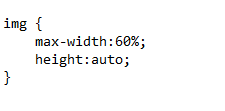
Use max-width to help with stubborn images that needs to be a specific width size. This makes it so that the image could never surpass the max width you entered.

2.Create An Area Where Text isn’t Allowed To Touch the Image

Use max-width to help with stubborn images that needs to be a specific width size. This makes it so that the image could never surpass the max width you entered.

3.Avoid Using Inline Code

By doing this, it will make it easier to maintain your page and also takes advantage of browser caching. This also prevents you from having an enormous headache for when you go and write a proper cascading style sheet, and your properties aren’t applying correctly. An example of inline code is shown to the right.

4.Correctly Pick Classes and IDs

When picking a class/ID name, try picking something relatively short, but at the same time, descriptive. Picking a name that is too long can make it difficult to read. Picking a name that is too short can make it cryptic and confuse you in the future.

5.Text Transform

Use the text-transform property to make sure specific blocks of text are uppercase, lowercase, and etc..

React Framework, What’s That?

Being that this is a web development blog, surely you know that React is is not a type of candy bar or a clothing company. So what is it and why should we care???

React is a JavaScript library used to create interactive UI components for web development. This is all fine and dandy but lets take a step back and learn what JavaScript and JavaScript libraries are.

What is JavaScript and they got libraries?

JavaScript is a scripting language used to control, maintain, and make dynamic web content. The things Javascript can do consist of making interactive forms, graphics, as well as adding automation to web pages. With this being said, a library takes all the useful functionality that JavaScript can provide and prepackage it into a collection of pre-written JavaScript code. The benefit of this is that these libraries will save developers time from writing code by hand.

Now that you know what libraries are, why is React Library so important?

React is a popular library used by web developers and programmers alike to create dynamic user interface. It is often called the “V in the MVC design pattern”. One of the greatest feature of React is the ability to make highly reusable/dynamic UI components that could be shared between web pages. These components can be things like navigation menus, forms, comment boxes, tables and many others.

Simple Component that display hello message

React got a lot of other benefits besides reusable components

  • Easy to learn React is considered one of the more user friendly UI Framework as oppose to its counterpart Angular. Angular has its own ways of doing thing which therefore makes it more difficult to learn. For React a programmer should just need to know basic understanding of JavaScript, CSS and HTML.
  • Mobile Development React has the ability to create mobile application. It has a sibling called React Native specifically made for mobile development
  • Data Binding React uses one-way data binding which makes it easier to debug self-contained components in React applications. Angular on the other hand uses two way data-binding which can be harder to follow and understand.
  • Performance React is one of the fastest UI library out there due to its secret weapon of Virtual DOM . By using a Virtual DOM, React can maximize its performance by only re-renderng when it is appropriate.
Design a site like this with WordPress.com
Get started